

 In development
Endpoint automation. In full view.
You declare what every computer should look like. Overseer reads each machine, corrects what has drifted, and checks the result before it reports the job done.
A script that ran is not the same as a computer that is right.
Most tools tell you a job was sent. They do not tell you whether the software is actually installed, at the right version, on that machine today. Overseer checks the computer itself, so “compliant” means it was looked at and it passed.
Say what should be true. Overseer keeps it true.
- 01
Describe the standard
Choose the software, settings and tasks a computer should have, for all clients, one client, a tag, or one machine.
- 02
Read the computer, not a report
Overseer checks what is really there and compares it with what you declared. This step changes nothing.
- 03
Put it right when you say
Missing software is installed, old versions are updated, unwanted software is removed, inside your maintenance window or when you press Run.
- 04
Checked before it is called done
Overseer looks again after every action and records the whole session.

Every change, accounted for.
Onboarding
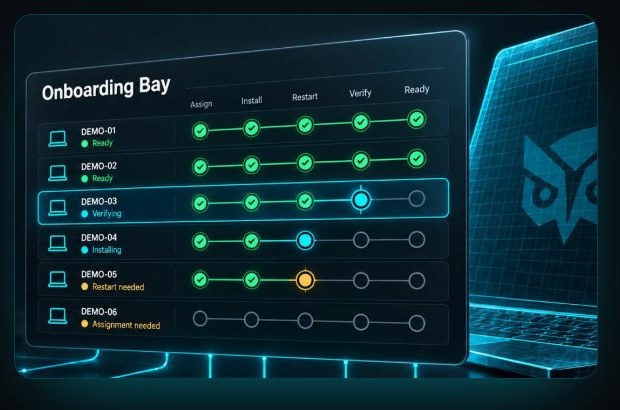
A new computer goes from unboxed to ready for its user in one run you can watch.
Scheduled maintenance
Work runs in the windows you allow, and restarts follow your rules.
Software and script library
Add applications from the Windows Package Manager catalogue, upload your own installers, write your own scripts.
Standing authorisation
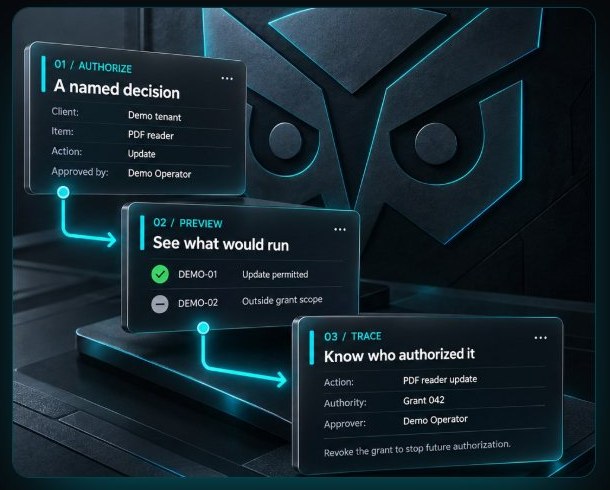
Overseer acts on its own only where a named person has allowed it.
Roles and audit trail
People see and do only what their role allows, and every action has a name on it.
Clients kept apart
Each client's computers, deployments and history stay separate.

Keep the tools you already run.
MSP owners
One standard across every client, and the record that proves it was met.
Technicians and engineers
Declare the work once, then read the session to see what ran and where it stopped.
Overseer installs as a lightweight agent and works beside the remote management tool you already run.
Written down, all the way through.
Every screen and behaviour is documented at overseercommand.com.
Want to know when it is ready?
Tell us about your MSP and we will let you know when Overseer opens.
