Learn How to Password Protect Your Google Search History from Prying Eyes & More

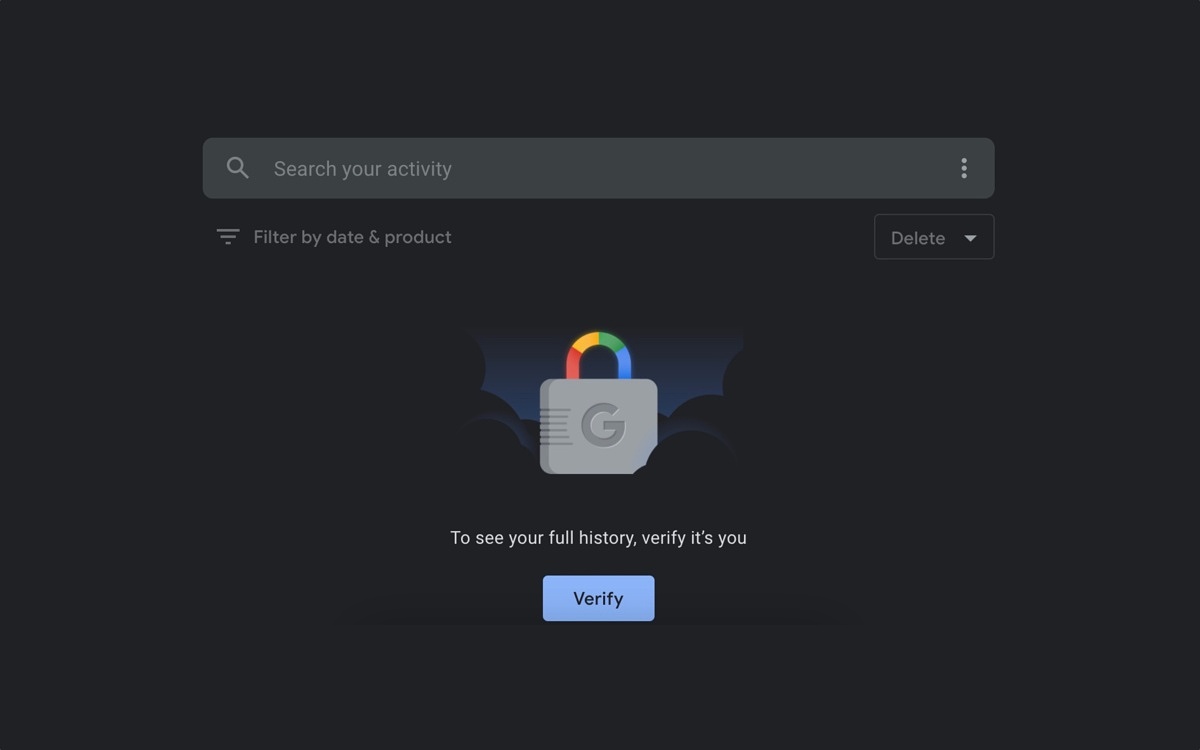
If you don’t have the verification turned on, visiting activity.google.com will show a stream of your Google activity from across your devices, without asking for a password.
Google-My-Activity-verification-turned-on

Google has added a way to put a password on your Web and Activity page, which shows all your activity from across Google services, including your searches, YouTube watch history, and Google assistant queries (via Android Police). Without the verification, anyone who picks up a device you’re logged into could see that activity.

To activate the verification, you can go to activity.google.com, and click the Manage My Activity verification link. From there, you can select the Require Extra Verification option, save, and enter your password to confirm that you’re the one trying to make the change.


The page can be very revealing, but also lets you manage a ton of your data in one place.

If you don’t have the verification turned on, visiting activity.google.com will show a stream of your Google activity from across your devices, without asking for a password.


Search history can show a lot about a person.

Turning on verification, however, will require whoever’s trying to see the information to click the Verify button and enter the Google account password before it’ll show any history. For those who share a computer, or who sometimes lets others who aren’t exactly trustworthy use their device, this could be a very useful toggle.


Now no one will know.

While you’re on the Web and App Activity page, you can also take a look at what activity Google is saving, and whether it’s being auto-deleted. Then, you can decide if you’re happy with those settings. If not, this is the page to change them.

At Google’s I/O keynote last week, it talked a lot about privacy with its announcement of Android’s new Private Compute Core, a locked photos folder, and the ability to quickly delete your past 15 minutes of browsing in Chrome.

Picture of Michael Duff

Michael Duff

Leave a Replay

Search

Our Latest News

FL Computer Tech is best choice for Managed-IT in Florida but what about the rest of the US? Choosing the right Managed Service Provider, aka MSP, is a daunting and critical responsibility and that’s why we created the  OutSourced MSP website.  OutSourced MSP is a Managed Service Provider directory website that helps businesses nationwide find reputable, Managed-IT services. Check it out!

Recent Posts

AddOn – AI and ML Connectivity Brochure

As AI environments scale, connectivity issues can impact performance and efficiency. ⚡ This brochure highlights @AddOn transceivers and cabling solutions validated for compatibility across leading platforms and real-world deployments. Take a closer look at connectivity designed to support reliable AI and ML performance at scale.

Read More »

Upgrade to the power of Windows 11 with Intel vPro

⏳ It’s time to upgrade. Download the datasheet, “Upgrade to the power of Windows 11 with Intel vPro,” for an overview of features in Windows 11 Pro with Intel vPro that reduce security incidents by 62% and speed workflows by 50%. Then, message us to start planning your upgrade with expert support. @Microsoft Windows

Read More »

Transitioning from Windows 10: A Strategic Guide

Successful upgrades start with a foundation you can trust. 🛡️ The eBook, “Transitioning from Windows 10: A Strategic Guide,” explains how Copilot+ PCs with Intel vPro simplify deployment and endpoint security. Download your complimentary copy to explore how your organization can move forward with the highest levels of security and manageability. @Microsoft Windows @Microsoft Copilot

Read More »

Follow Us

Video Archive

Sign up for our Newsletter

Looking for the latest in technology news? Do you like tips, tricks and shortcuts? Sign up today!

Looking for the Best Managed-IT Business Solutions?

Need immediate computer support? A certified technician is only a call and a click away.

Subscribe our newsletter to get our latest update & news

3501 Quadrangle Blvd
Suite #305
Orlando, FL 32817

1-(941) 564-5464

Open Hours:

Mon - Sat: 8 am - 5 pm,
Sunday: CLOSED
24/7 Emergency Services Available